1. After unzip the download pack, you'll found a Template Folder with all the files.
2. You can view this Template in any browser, you can display or edit the Template without an internet connection.
3. Now go to your cpanel or open your FTP Client (like Filezilla) and upload the content of the Template on your server root.
4. Once the files are done uploading go to www.yourdomainname.com/index.html
HTML Folder Structure - top
How To? - top
Changing the logo
Insert logo image source in index.html line in 50 and save

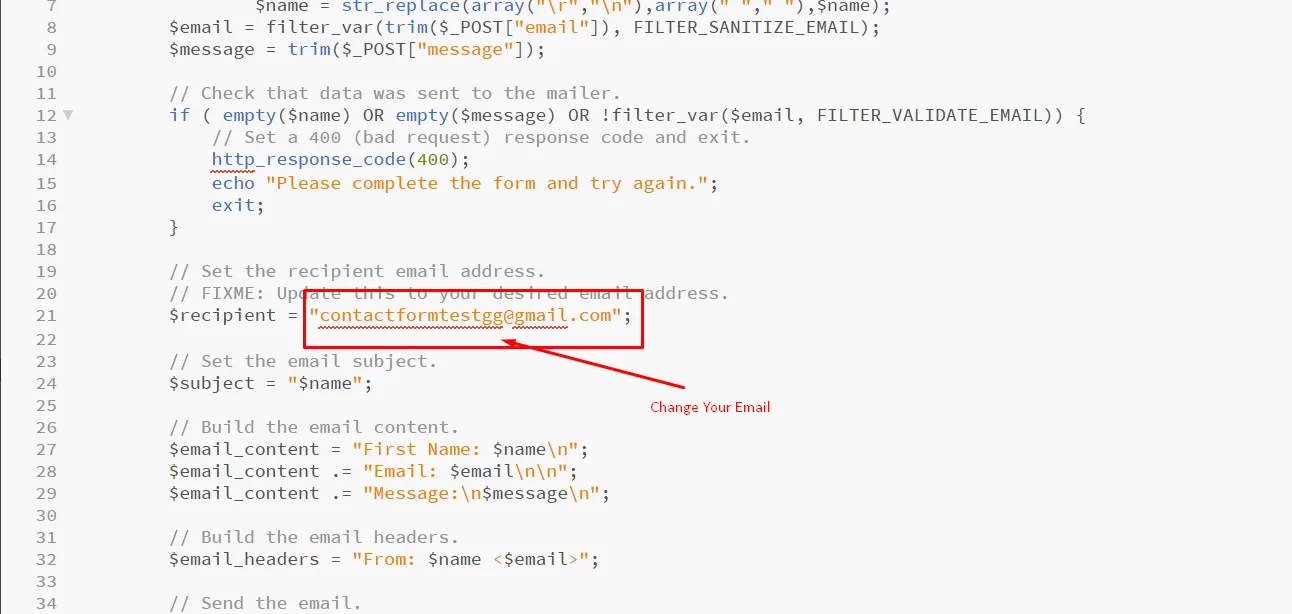
Configuring Contact Form
Open contact.php file from assets folder of template and replace the email address with yours.
Changing Default Color
Default color is #0067f4 find out all #0067f4 from assets->css>style.css file and replace it with your own color code, to change the color preset
Changing Font Family
To change the font-family you have to change the current font-family property with your own font-family (from style.css file) and required weight. But, make sure you have already included the font on header (using CSS link) or on CSS (using import).
body {
font-family: "Poppins", sans-serif;
}
h1,h2,h3,h4,h5,h6 { font-family: "Poppins", sans-serif;}
Sources and Credits - top
Free fonts:
Icons:
Plugin: